
New AIO3 Mapping for Traktor Pro and Maschine Jam
The AIO3 — All In One — mapping for Maschine Jam and Traktor Pro is the most complete MIDI mapping available for this hardware combination. In this post, you will learn what makes the AIO3 Maschine Jam mapping different from previous versions, what new features it introduces, and how each of the four deck modes looks on the hardware. Moreover, the AIO3 package also includes the AIO3 Elastic variant, which offers an alternative control feel for live performance. First, however, let’s look at what makes this mapping an all-in-one solution.
What Is the AIO3 Maschine Jam Mapping?
The AIO3 Maschine Jam mapping merges all previous MIDI mappings for Maschine Jam and Traktor Pro into a single unified file. In particular, it combines track deck control, stems deck control, remix deck triggering, and a full step sequencer — all in one download. As a result, you no longer need separate mapping files for different performance modes.
Furthermore, the AIO3 mapping integrates part of its control logic directly into the mixer section of the Maschine Jam. Consequently, all four decks become more versatile and more responsive at the same time. In other words, the same hardware covers more functions with better feel than any previous version.
AIO3 Maschine Jam Mapping — Four Deck Modes
Track Decks

In Track Deck mode, the Maschine Jam pad grid shows a clear color layout for immediate visual orientation. In particular, the top row displays hot cues 5 through 8 in orange, while the blue and purple pad blocks in the upper left handle core deck controls. Furthermore, the teal pad section in the lower right covers the sample slot area, and the pink pads E through H serve as deck selectors. The AUX, CONTROL, and LOCK buttons on the left and right sides stay active, confirming the current control layer. As a result, all essential track deck functions — cue points, loops, deck switching, and FX — are accessible from a single view.
Stems Decks

In Stems Deck mode, the pad grid switches to a layout optimized for individual stem layer control. In this mode, green pads spread across the full 8×8 grid represent active stem layers — bass, drums, melody, and vocals — across both Deck A and Deck B. Moreover, the bottom row shows a blue pad block for deck A/B/C/D selection. The AUTO and SWING buttons activate on the right side, reflecting the swing and automation state of the current stems configuration. Consequently, you can mute, filter, and adjust each stem layer independently without leaving the performance view.
Remix Decks
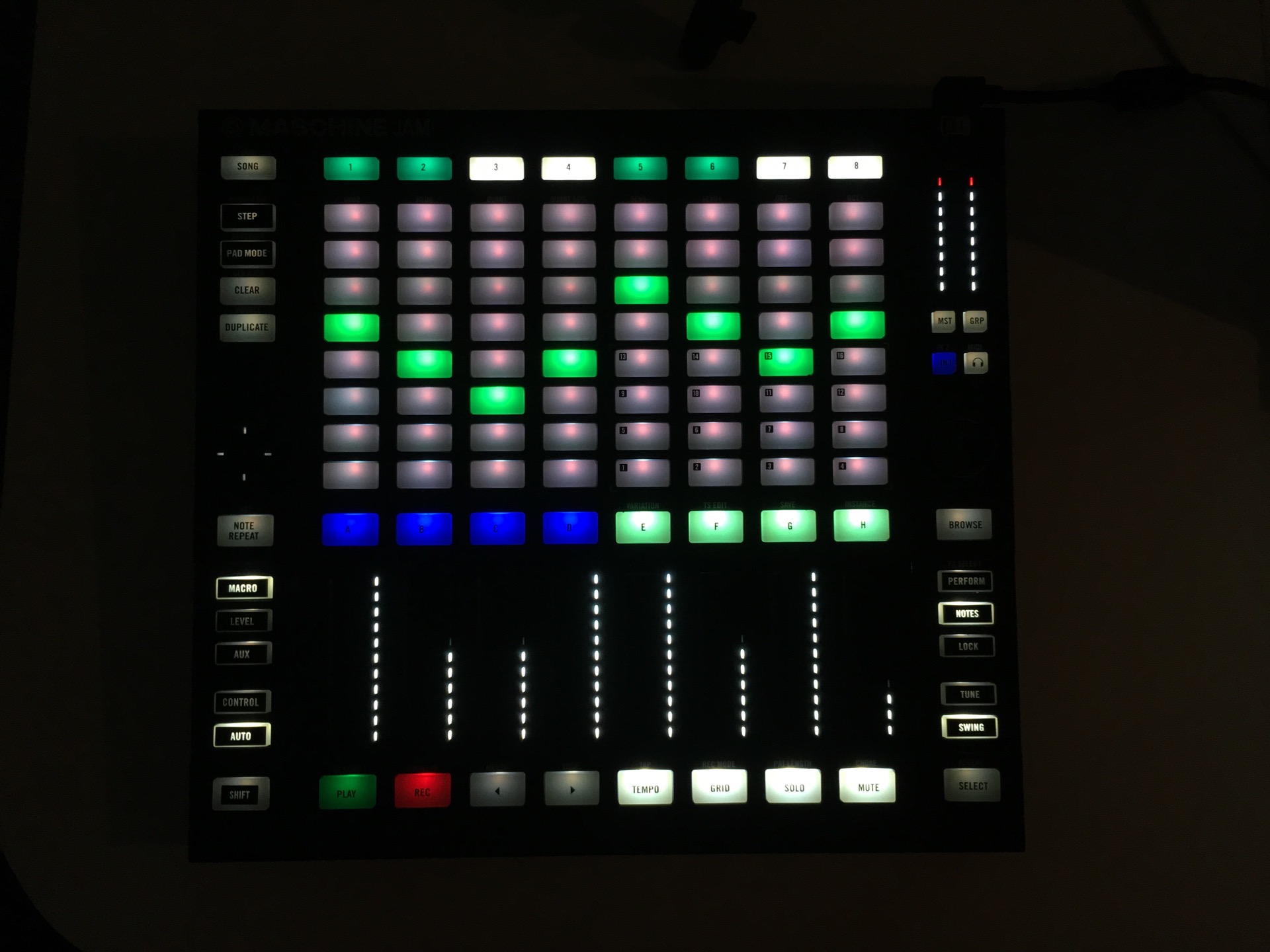
In Remix Deck mode, the Maschine Jam grid displays the full sample cell matrix across the upper section. In particular, the top rows show white, blue, cyan, pink, and magenta pads representing sample cells in different states — loaded, playing, empty, or waiting. Furthermore, the left column shows green pads indicating active sample slots in Deck C. The LEVEL, CONTROL, and TUNE buttons stay active, confirming that volume, filter, and pitch controls are available. As a result, the entire remix deck — including all sample slots, cell states, and mix parameters — is visible and controllable from the hardware at all times.
Step Sequencer

In Step Sequencer mode on Deck D, the pad grid takes on a rhythm-programming layout. In particular, the top two rows display blue and purple step pads covering the full 16-step sequencer grid. Moreover, the DUPLICATE row shows yellow-green pads on the left indicating active pattern presets. The deck selector row at the bottom shows red pads for Decks A and H and blue pads for Decks B and C, making it easy to switch context. Furthermore, the AUX and LOCK buttons remain active, confirming the current modifier state. Consequently, pattern length, individual step activation, and preset selection are all available from a single hardware view.
58 New Rhythmic Templates
One of the most significant additions in the AIO3 mapping is the 58 newly added rhythmic templates for the step sequencer on Deck D. Moreover, Deck D itself is a hybrid — it functions as a sample deck by default, but you can switch it to step sequencer mode at any point. Consequently, this hybrid approach opens up rhythmic combinations that go well beyond standard DJ performance.
For example, you can layer sequenced patterns over looped track sections from Decks A and B, which produces results that feel closer to live production than traditional DJing. In addition, combining the step sequencer with the looper creates unexpected rhythmic moments that are unique to each performance.
AIO3 Elastic — Toggle to Touch Mode
In addition to the standard AIO3 mapping, the download also includes the AIO3 Elastic variant. In the Elastic version, a selection of buttons switches from toggle mode to touch mode. As a result, those buttons return automatically to their default state after use. This gives you more confidence during fast performance, because the mapping always returns to a known initialization state after each function. Furthermore, the Elastic variant suits DJs who prefer a reactive control style over a latch-based workflow.
AIO3 Maschine Jam Mapping — Download Contents
| File | Description |
|---|---|
AIO3.tsi |
Standard mapping — toggle mode |
AIO3_elastic.tsi |
Elastic variant — touch mode |
traktor-jam-03.ncmj |
Controller Editor template |
| PDF layout guide | Full sections and functions schema |
Ready to upgrade your Traktor Pro setup with the AIO3 Maschine Jam mapping? Get the full AIO3 package and take complete control of all four deck types from a single controller.
Published by Bruno Gum | PROMOTEUS — Maschine Jam mappings for Traktor Pro